Check the exact sensor model
Read the model manual for Bluetooth heart-rate broadcasting and compare it with the evidence matrix. Do not extend a claim from one model to every product from the same brand.
IPHONE APP + CHEST STRAP
A useful iPhone app should find your active Bluetooth chest strap inside the app, show changing BPM and make the next step obvious. Strap Zone is built around that direct setup and a focused live test.
Try the iPhone connection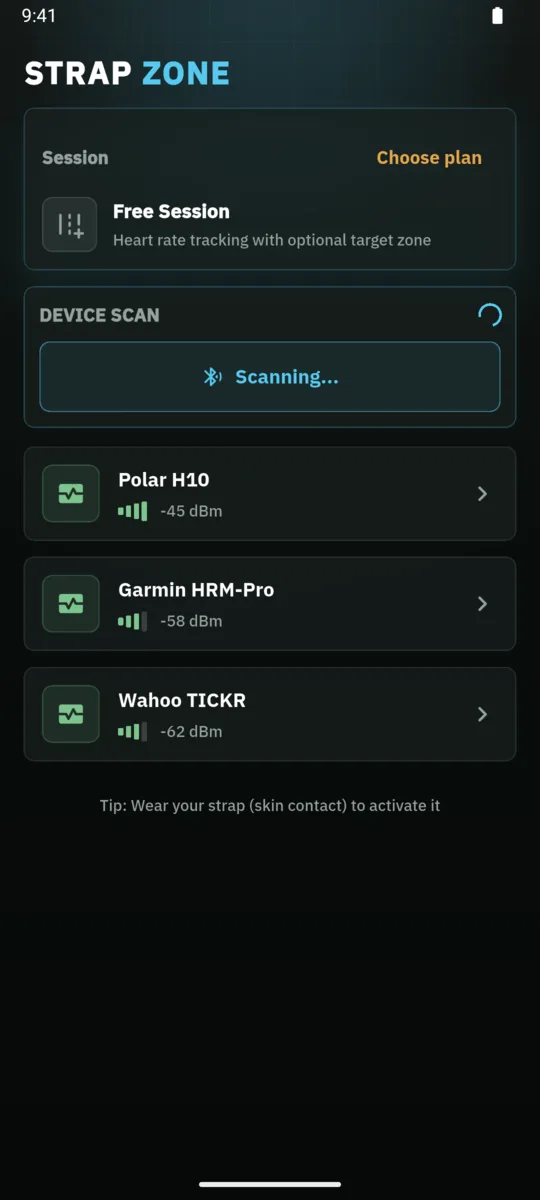
SHORT ANSWER
For a chest strap app on iPhone, first confirm that the exact sensor model broadcasts the standard Bluetooth Low Energy Heart Rate Service. Wear and activate the strap, scan from inside the app, and do not start a workout until the displayed BPM changes with your heart rate.
WHY STRAP ZONE
The app, sensor and iPhone must agree on the same connection method. Strap Zone scans for the standard BLE Heart Rate Service and subscribes to its live measurement. A Bluetooth logo or ANT+ support alone does not establish that an exact chest-strap model exposes this service to an iPhone.
The best first test is deliberately small: put the strap on, keep the phone close, open the scan inside Strap Zone and select the sensor. A changing BPM value is useful confirmation that the live path works. Only then set zones, choose alerts and begin recording a real session.
HOW IT WORKS
Read the model manual for Bluetooth heart-rate broadcasting and compare it with the evidence matrix. Do not extend a claim from one model to every product from the same brand.
Wear the strap and follow its instructions for skin contact or electrode moisture. Keep the iPhone close, enable Bluetooth permission and scan from the device screen in Strap Zone.
Select the sensor and wait for a changing BPM value. Once the signal is visible, set your zones, optional audio or vibration alerts and the workout type you want to record.
01 / watch-free
Scan for the active sensor inside Strap Zone. Pairing only in the general iPhone Bluetooth screen is not the standard setup for every chest-strap app.
Bluetooth chest strap scan in the Strap Zone iPhone app02 / watch-free
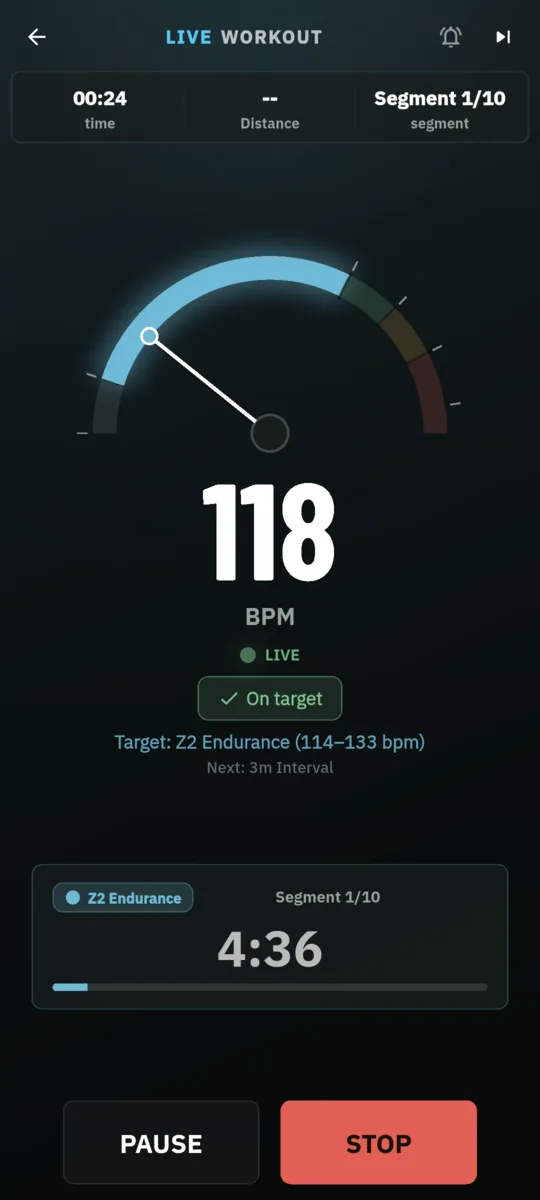
A changing heart-rate value confirms more than a device name alone. Verify it before adjusting zones or starting a recorded workout.
Live BPM confirmation after connecting a chest strap to iPhone03 / watch-free
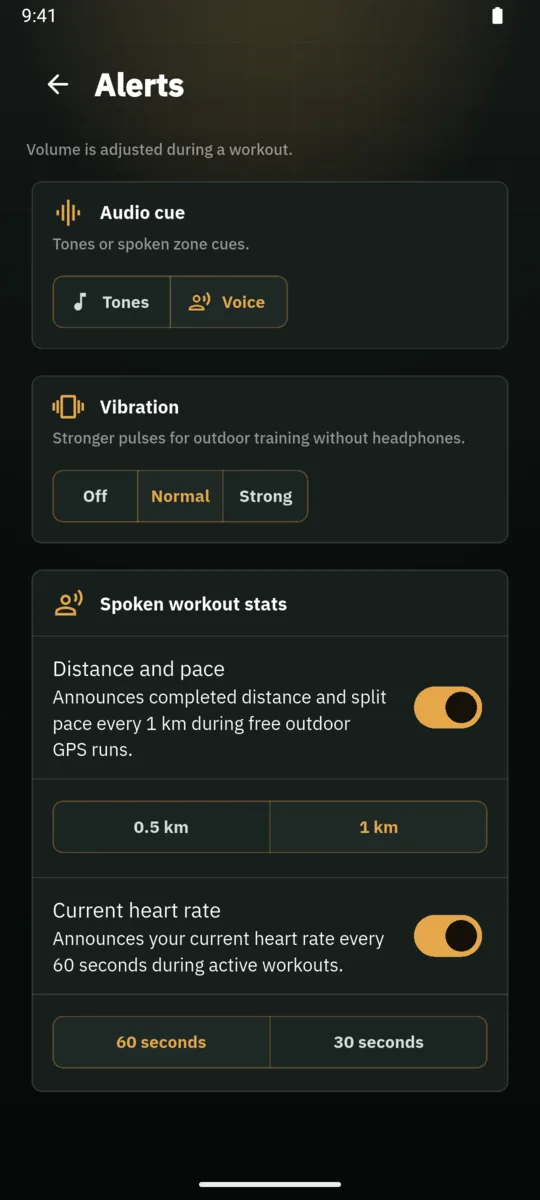
Once the signal works, configure zone, voice, tone or vibration feedback for the way you train. Alerts are optional and remain under your control.
Heart-rate zone alert choices in the Strap Zone appBLE COMPATIBILITY
Strap Zone targets the standard BLE Heart Rate Service. Manufacturer documentation describes Bluetooth heart-rate broadcasting for the Polar H10 and smartphone Bluetooth pairing for the Garmin HRM-Dual, so the public matrix labels those exact models Protocol compatible. That is an expected protocol fit, not a physical Strap Zone lab test, and it says nothing about every model sold by either brand.
Check compatibilityPRIVACY
Strap Zone does not require an account for the core setup. Heart-rate and optional route data stay on the iPhone unless you choose to export a completed workout. Bluetooth permission is used to discover and receive data from the sensor.
Read the privacy detailsMODEL CHECK
These rows come from the reviewed public matrix. They are examples, not the full list, so always verify the exact model you own.
| Device or type | Evidence | What it means here |
|---|---|---|
| Polar H10Chest strap | Protocol compatible | Polar documents Bluetooth heart-rate broadcasting and two simultaneous Bluetooth connections. Strap Zone lists the exact H10 as Protocol compatible, not Lab tested. |
| Garmin HRM-DualChest strap | Protocol compatible | Garmin documents Bluetooth pairing with a compatible smartphone or tablet. This applies to HRM-Dual specifically, not every Garmin strap. |
| Wahoo TICKRChest strap | Protocol compatible | Wahoo documents Bluetooth use with iOS and third-party apps for the exact TICKR model only, not every TICKR-branded device. |
| Multiple Watch with BLE heart-rate broadcast modeBroadcasting wearable | Unknown | A watch can stay Unknown until the exact model exposes the standard BLE Heart Rate Service while broadcast mode is active. |
| Multiple ANT+-only heart-rate sensorLegacy chest strap | Not supported | ANT+ alone is not enough. Strap Zone requires the standard BLE Heart Rate Service over Bluetooth. |
Need the full matrix, sources and limitations? Open the compatibility evidence
FAQ
Activate and wear the sensor, allow Bluetooth access, then scan from the device screen inside the app. Select the sensor and verify that the displayed BPM changes before starting a workout.
Not necessarily. Many fitness apps discover BLE heart-rate sensors inside the app rather than through the general Bluetooth device list. Follow the exact sensor manual when it specifies a first-time setup.
Look for support for your exact sensor protocol, a clear live BPM test, useful zone feedback, understandable recording and export behavior, and transparent privacy terms. Features cannot compensate for an incompatible signal.
No. The exact model must expose a compatible Bluetooth heart-rate signal. ANT+ support alone and brand-level assumptions are not enough.
It depends on the sensor model and its connection limits. When troubleshooting, close competing receiver apps, keep the phone close and test one app at a time.
READY FOR YOUR STRAP
Open Strap Zone on your iPhone, activate the exact sensor you own and confirm live BPM. Once that works, choose the zones and feedback that fit your training.
Try the iPhone connection